Contents
Robinhood did not make a boring signup form “go viral.” It paired a sharp promise with a reason to share.
The original page told visitors exactly what was coming: commission-free stock trading. After signup, people saw their place in line. Referring friends moved them closer to early access.
That loop helped Robinhood grow from roughly 10,000 signups on day one to 50,000 in the first week and nearly one million in the first year, according to co-founder Vlad Tenev in a 2017 Business Insider interview. In an earlier HuffPost interview, Tenev said more than two-thirds of the waitlist came from referrals.
The lesson is not “copy Robinhood’s green page.”
The lesson is: make the offer clear, show progress immediately, and reward the exact behavior that helps your launch.
Quick answer: A Robinhood-style referral waitlist collects an email, gives each person a unique share link, shows their position in line, and moves them forward when verified friends join. Build the loop around real early-access value—not fake scarcity or a giant prize unrelated to your product.
If that is the launch you want, start with KickoffLabs’ referral waitlist campaign type. It handles personal links, position tracking, referral attribution, follow-up, and fraud checks without asking your team to build a growth system from scratch. For queue rules, verification, and launch waves, see our referral waitlist guide.
What Robinhood Actually Built
Strip away the famous brand and the original system was simple:
- A specific promise: stop paying trading commissions.
- A low-friction signup: one email field.
- Visible status: your current place in line.
- A personal referral link: one link the system could attribute to you.
- A meaningful reward: move closer to access when friends joined.
- Ongoing communication: remind people why they joined and how to check their status.
That combination matters.
A position counter without demand is just a large number. A referral link without an incentive is homework. A great offer without follow-up becomes a cold spreadsheet.
Robinhood’s breakthrough was not one clever widget. The promise, queue, and reward all reinforced one another.
Robinhood landing page anatomy: the actual screens
These are archived Robinhood screens from the earlier version of this KickoffLabs guide, not a live Robinhood page or a KickoffLabs template. The screenshot below captures a later video-background signup iteration; the underlying offer stayed straightforward.

- Headline and supporting line: “$0 commission stock trading” and “Stop paying up to $10 for every trade” name a concrete benefit rather than a vague coming-soon promise.
- One-field signup: the page asks for an email address, not a full profile.
- CTA: “Get Early Access” explains what submitting the form does. The video background was presentation, not the referral mechanism; a static, fast-loading mobile page can do this job today.
The real referral ask appeared after signup. In this archived status view, the page confirms the reservation, displays “People ahead of you,” explains that referring friends earns earlier access, and supplies social-share buttons plus a unique link. The displayed position is a historical example, not a typical result or a current live queue.
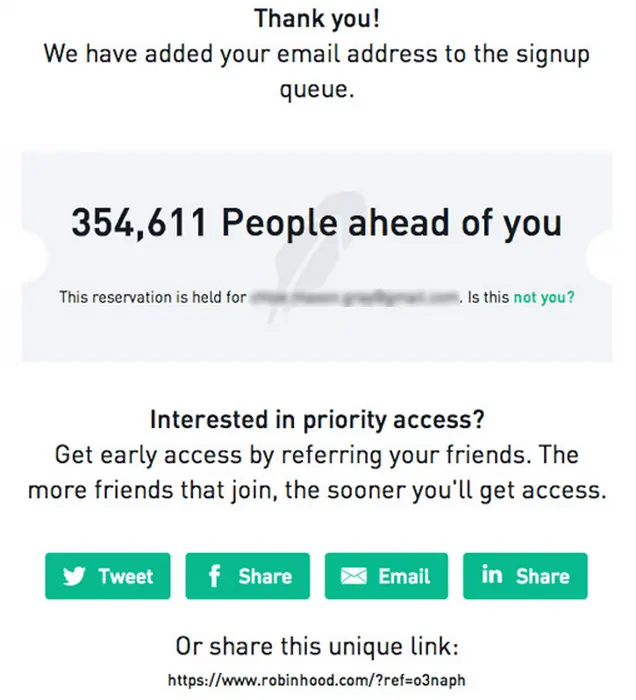
What to copy in 2026: the specific benefit, short form, immediate status reveal, and explicit next action. What not to copy blindly: the video background, an arbitrary queue number, or priority access you cannot actually honor. The screens document Robinhood’s historical execution; they do not imply that Robinhood used KickoffLabs.
A full-page version made with the new KickoffLabs designer
Here is a sample campaign made in the current full-page designer, not a Robinhood page or a claim about Robinhood’s software. This example uses the Fintech Sharp style and a dark split header with a green signup button. It echoes the clarity of Robinhood’s offer without copying its branding; the style alone does not select that header layout. Scroll the whole page: the promise leads into benefits, a signup form, a share section, and an FAQ. The sample app and its copy are illustrative.
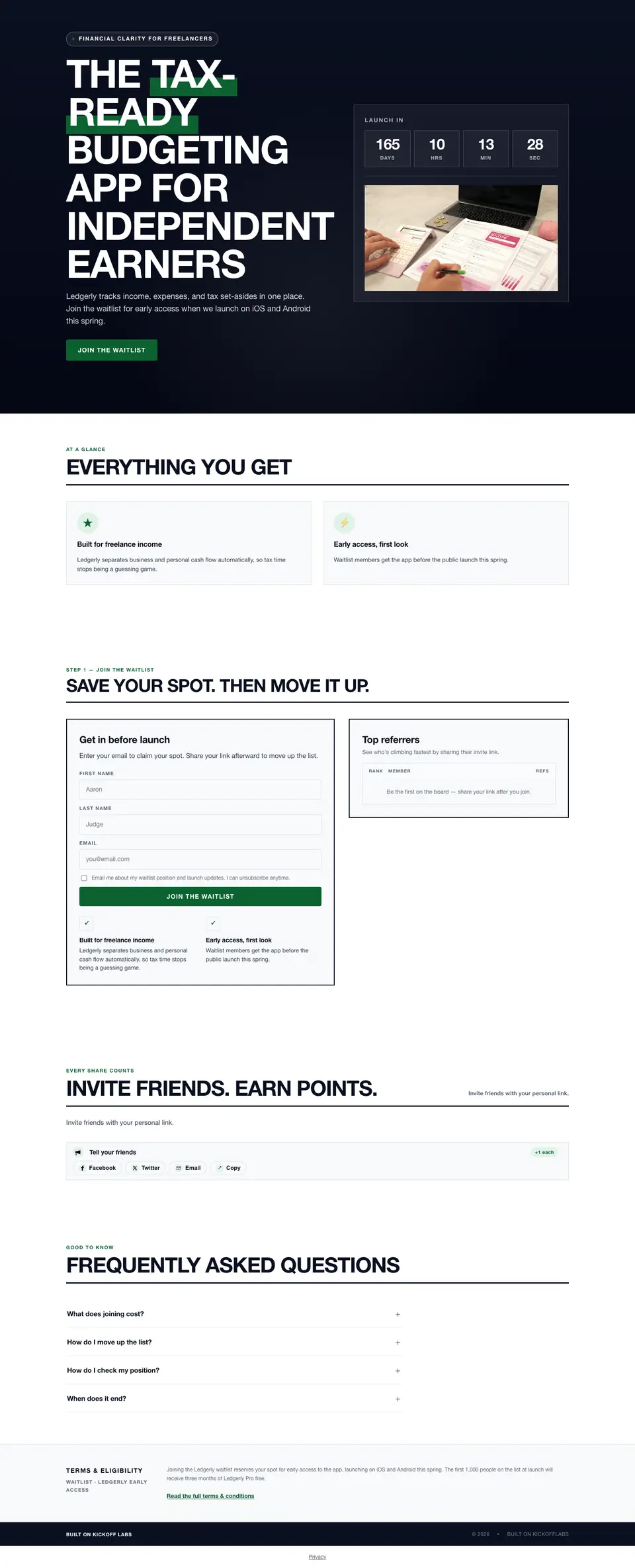
Before signup: the example form asks for first name, last name, and email; for a Robinhood-style low-friction page, remove the name fields and ask for email only. The empty leaderboard is not evidence of actual entrants. After signup: the same full page reveals a personal status card, a sample position, referral count, and share link where the form had been. The numbers in this sample are illustrative, not a live campaign result. Its “earn points” share copy also differs from its “move up the line” status copy; change both to one honest, consistent reward promise before publishing.
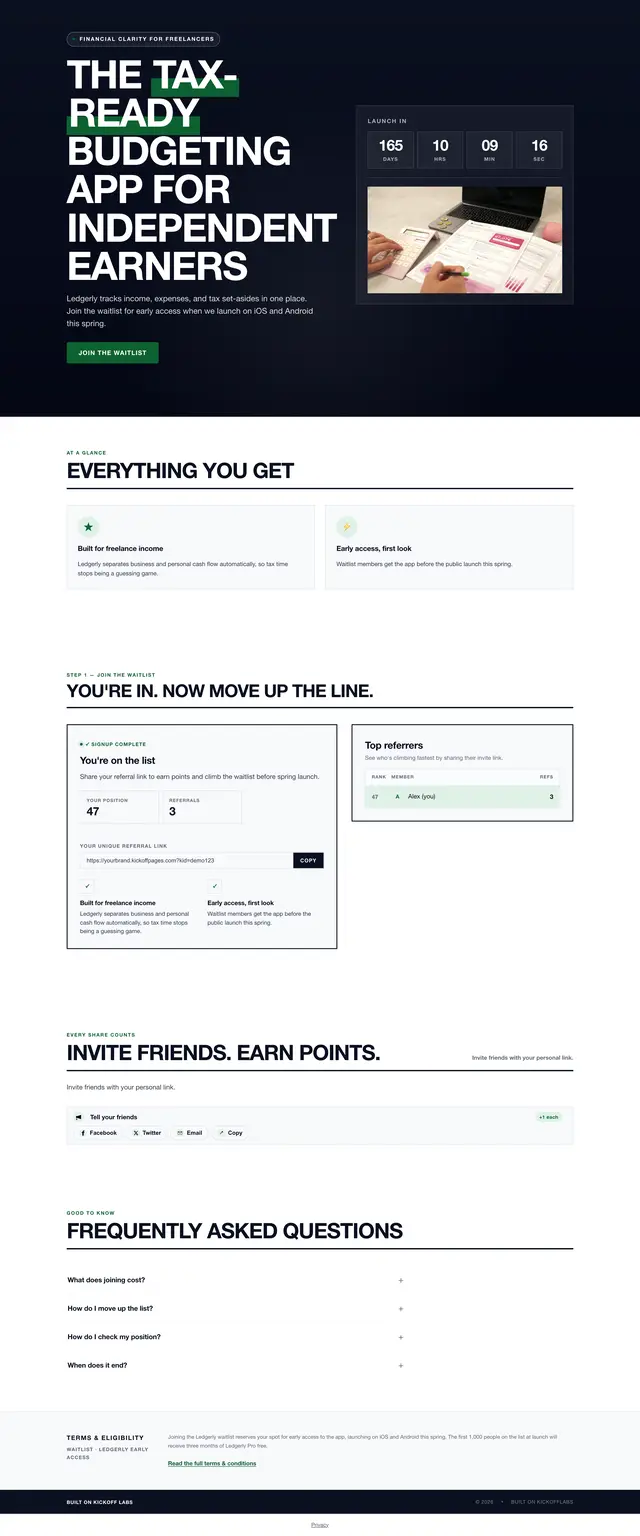
Notice the handoff: signup does not end on a generic thank-you screen. The page changes into a place to check progress and invite friends. See the full-page waitlist examples for other header and section treatments.
The traffic spark and the growth loop were different things
Robinhood’s initial traffic did not appear out of thin air. Tenev told Business Insider that an anonymous Hacker News post sent the first surge.
That distinction is useful.
Distribution started the fire. The referral loop helped it spread.
You still need a launch channel: a founder audience, partners, customers, a community, press, affiliates, paid traffic, or a relevant platform. Referral mechanics do not manufacture interest. They multiply interest that already exists.
If your first 100 visitors do not understand or want the product, adding “invite three friends” will not rescue the page.
The 2026 Robinhood Waitlist Blueprint
Here is the version worth copying now.
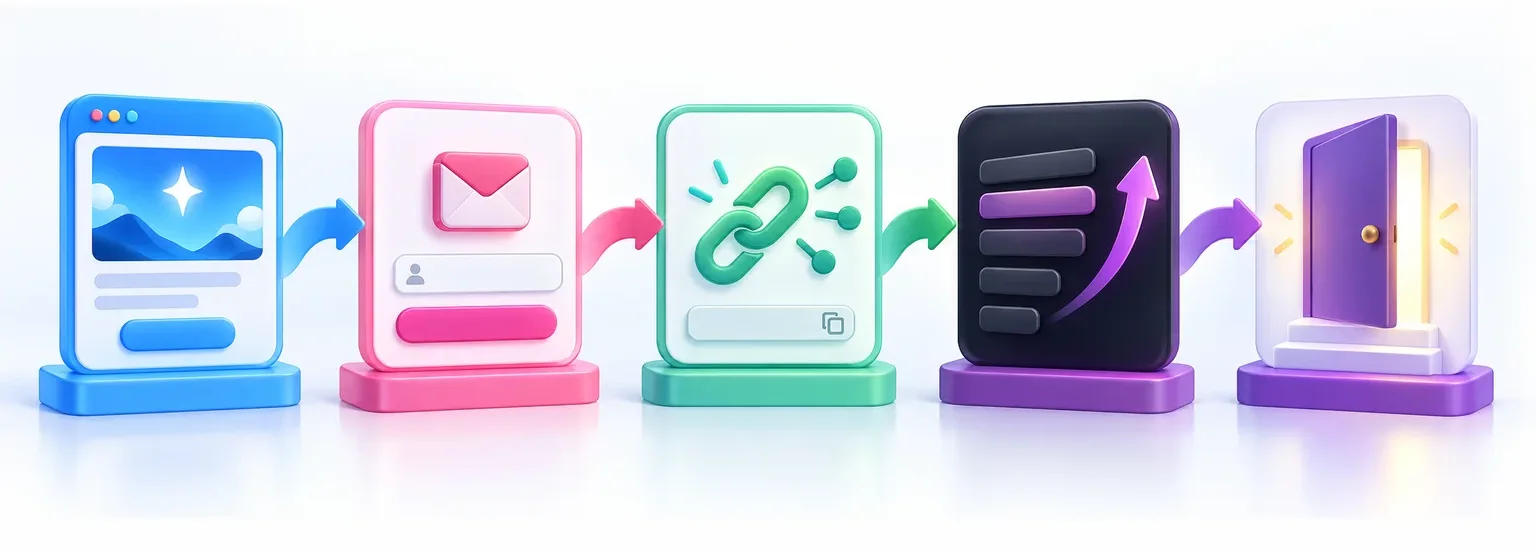
1. Make the promise specific enough to repeat
Robinhood’s original message worked because a visitor could repeat it to a friend in one sentence.
Your headline should do the same.
Weak:
Join the waitlist for our exciting new productivity platform.
Better:
Finish your weekly plan in ten minutes without another project-management maze.
Weak:
Be the first to experience the future of skincare.
Better:
Get early access to refillable skincare built for humid climates.
The test is simple: if a signup cannot explain why the product matters, that person will not refer someone else.
Write the value proposition before you design the page. One precise promise beats a video background, six animated sections, and a paragraph about “reimagining the future.”
2. Keep the first form short
For most product launches, ask for email and stop.
Add first name if you will use it. Add one qualifying field if it changes how you segment, invite, or sell. Do not turn the waitlist into a loan application.
Good qualifying questions include:
- What are you trying to launch?
- Which tool do you use today?
- When do you expect to buy?
- Which product category interests you?
The question should help you make a decision later. If it will sit unused in a CSV, delete it.
3. Turn the confirmation page into the share page
The referral loop begins after signup, not three days later in email number four.
Immediately show:
- A personal referral link.
- Current position or milestone progress.
- The exact reward for a verified referral.
- One-click sharing and copy-link controls.
- A short, editable message people can send.
The visitor has just said, “I want this.” That is the best moment to ask, “Who else would want it?”
A plain “Thanks, check your inbox” page wastes the highest-intent moment in the whole flow.
4. Choose one progress system
Robinhood used queue position. That does not mean every waitlist should.
Use position in line when access is limited and earlier access is valuable. It creates urgency without requiring a physical reward.
Use milestone rewards when you can offer useful perks at clear thresholds. For example:
- 1 verified referral: behind-the-scenes launch update.
- 3 verified referrals: early beta window.
- 5 verified referrals: founder Q&A or private onboarding.
- 10 verified referrals: premium trial, launch bundle, or priority support.
That threshold ladder is the core of a milestone referral program, which covers how to space the goals and budget each reward.
Use a leaderboard when the audience enjoys public competition and you can reward top advocates fairly.
Use a giveaway when a prize is central to the campaign—but be honest about the tradeoff. Broad prizes can grow the list while lowering buyer quality.
Our pre-launch referral waitlist template guide breaks down the page sections, reward options, and copy. If you want a broader launch sequence, the product launch waitlist guide covers validation and rollout planning.
5. Count qualified referrals, not every click
Referral fraud is not a weird edge case. The moment position or rewards have value, some people will try self-referrals, disposable addresses, bots, or referral rings. If you are still choosing a campaign stack, compare prelaunch waitlist tools by use case.
Decide what counts before you launch.
A qualified referral may require:
- A unique, verified email address.
- No obvious self-referral signal.
- Completion of a qualifying field.
- Confirmation from the referred person.
- A purchase, activation, or other meaningful action later.
Then explain the rule in plain language.
Do not quietly change the scoring system after people start sharing. That burns the trust you are trying to build before the product even ships.
KickoffLabs can track referrals, flag suspicious activity with fraud protection, and let you reward milestones with reward levels.
6. Send emails that keep the promise alive
A referral waitlist is not a one-email campaign.
At minimum, send:
The immediate confirmation
Confirm the signup, restate the promise, include the personal referral link, and show how progress works.
The progress reminder
Tell people where they stand and what the next referral unlocks. Send this when there is useful movement, not every time someone drops one position.
The product update
Show what changed, what you learned, or what early testers are doing. Give people something worth forwarding besides “we still exist.”
The launch or invitation email
Explain who gets access, what to do next, and whether the queue still matters. Do not make the person who waited three months hunt for the button.
The not-yet email
If the rollout is gradual, tell everyone else what happens next. Silence turns anticipation into suspicion.
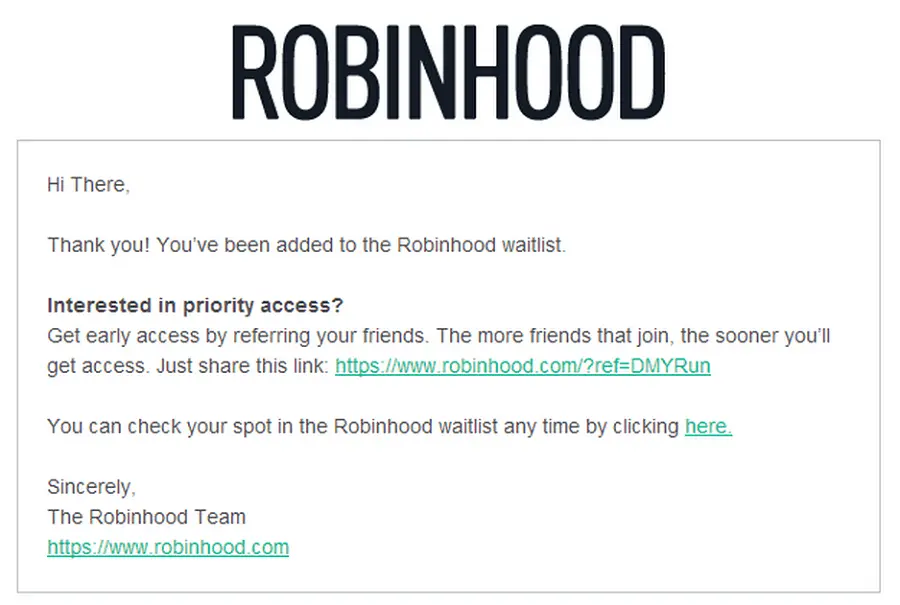
For a fuller sequence, use these prelaunch email templates. Robinhood’s archived confirmation email below kept the same priority-access promise, repeated the unique share link, and let subscribers check their spot. This is a historical Robinhood example from the earlier KickoffLabs guide, not a current KickoffLabs email template.
Build It in KickoffLabs
You can launch the simple version without recreating Robinhood’s infrastructure.
Step 1: Create the campaign in the new dashboard
In the KickoffLabs dashboard, select New campaign → Waitlist → Referral Waitlist. Or, if you are already signed in, open the Referral Waitlist recipe in the builder. The referral waitlist recipe is the skip-the-line mechanic: friends who join through a personal link help the original subscriber move up. If you need threshold perks instead, choose Waitlist + Milestone Rewards; do not mix several mechanics on day one.
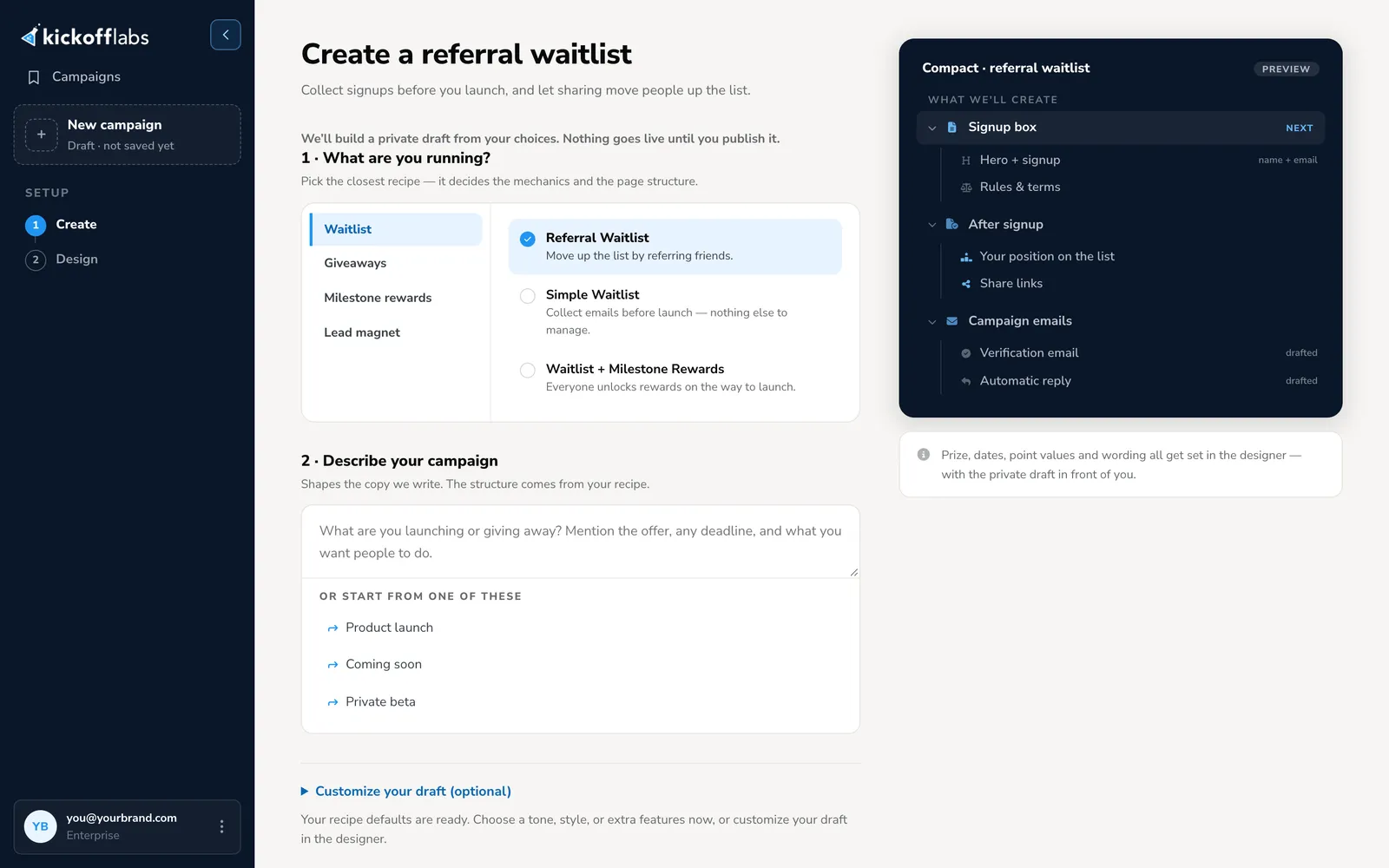
The screenshot shows the default Compact signup box, before customization—not the finished full-page example. Write a two-sentence brief naming the audience, benefit, launch timing, and reason a referral earns priority. Open Customize your draft, switch the format to Long Form for a full page, then choose a tone and the Fintech Sharp starter style. Select a dark split hero/header layout in the designer and write a direct promise with a clear signup action; the style alone does not guarantee that header. Choose Create my draft; nothing is live just because you generated a draft.
Step 2: Edit and publish the full page
In the designer, use the Signup view to edit the headline, header, benefits, form, and FAQ. The full-page example above shows the shape—not text to copy. Keep the page focused on who the product is for, the outcome, why joining now matters, and what happens after signup. Use a hosted KickoffLabs page for this version; an embedded form is a different presentation and will not reproduce the full-page header.
Use Post-signup to preview the status/share state on that same page, then Preview on desktop and mobile. Confirm the promise and referral reward are consistent in both states before publishing. You can change section layouts and add or remove sections in the designer; do not preserve a decorative section if it hides the signup action.
Step 3: Configure the status experience
After signup, show the lead’s personal link, position or progress, and next action.
Test this with a real second email address before announcing the campaign. Confirm that:
- The share link contains the right referral attribution.
- A referred signup credits the correct person.
- Position or milestone progress changes as expected.
- Self-referrals or duplicate entries are handled correctly.
- Mobile visitors can copy and share the link.
“Looks good in preview” is not a complete test. Run the loop end to end.
Step 4: Write the emails before traffic arrives
Set the autoresponder, progress reminders, and launch message before promotion.
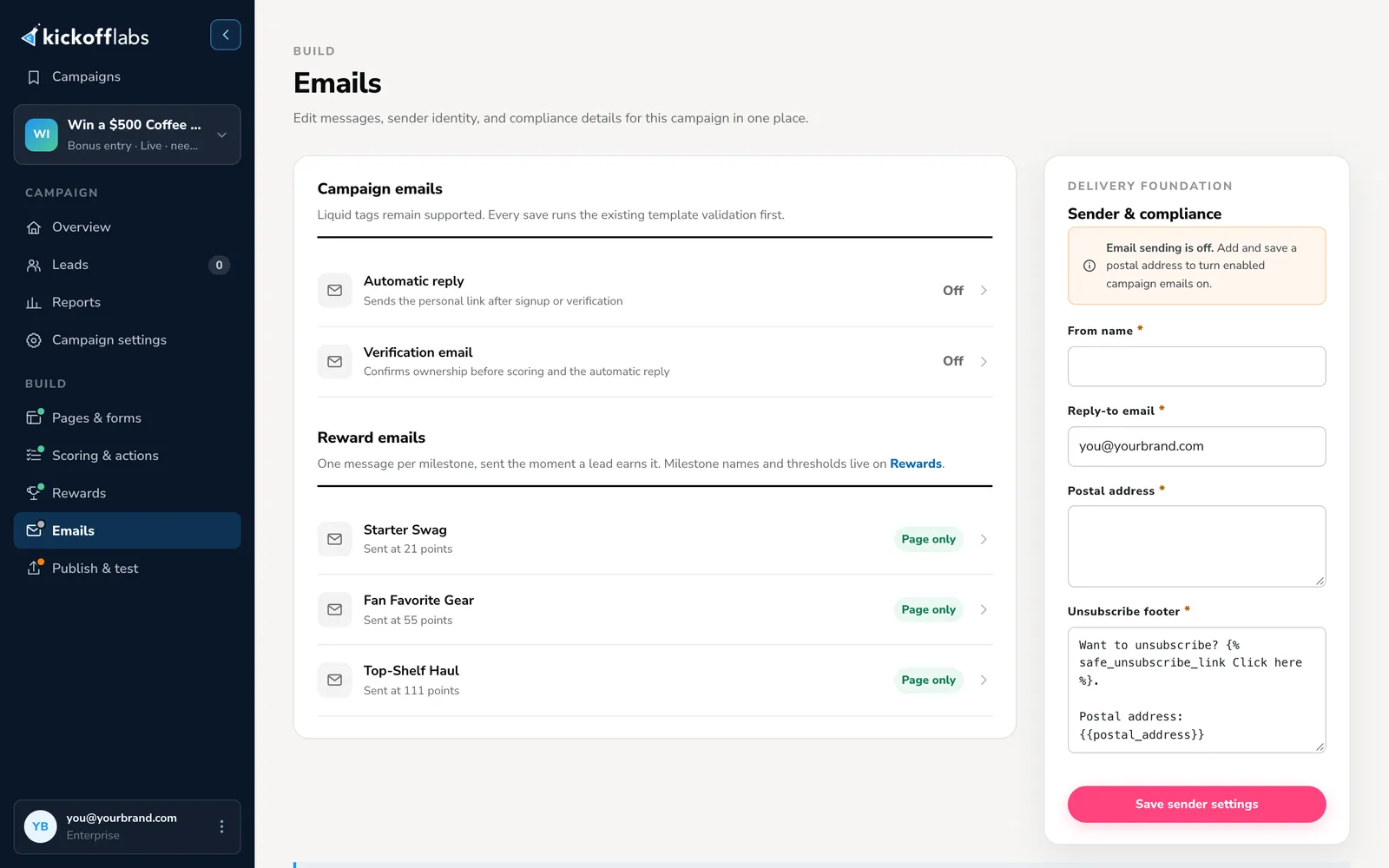
Use the same language across the page, status experience, and email. If the landing page promises “priority beta access” but the email says “bonus entries,” you have created two campaigns by accident. The KickoffLabs Emails screen below is a product UI example from a separate sample campaign; it shows where to configure automatic replies, verification, reward emails, and sender details—not a Robinhood email setup.
Step 5: Connect your launch stack
Send waitlist leads and referral context to the tools your team already uses. KickoffLabs supports email and marketing integrations, webhooks, hosted pages, embeds, and custom forms.
Preserve the useful fields:
- Original source and campaign.
- Referral source.
- Verified referral count.
- Position or reward tier.
- Qualifying answers.
- Consent status.
A large list with no source or qualification data is harder to launch to than a smaller list you understand.
What to Measure
Do not grade the waitlist on total signups alone.
Track:
Landing-page conversion rate
How many relevant visitors join? Segment by source. A founder newsletter and a broad social post may produce very different intent.
Referral participation rate
What percentage of new signups share or generate at least one referred signup? This tells you whether the post-signup ask is understandable and motivating.
Qualified referral rate
How many referred signups meet your quality rule? Raw volume can hide junk.
Viral coefficient
Roughly: how many qualified new signups does each existing signup create?
You do not need a coefficient above one for the campaign to work. A loop that reliably adds qualified signups can lower acquisition cost and reveal your strongest advocates even when paid, partner, or founder-led distribution still supplies most traffic.
Activation after launch
The waitlist is not the finish line.
Measure who opens the invitation, activates, buys, stays, or completes the action your launch was built around. Compare referred and non-referred leads. That is how you learn whether the loop grew demand or merely grew a number.
Mistakes the Robinhood Story Does Not Excuse
Copying the interface instead of the offer
A green page and a queue counter will not create demand. Robinhood’s promise was unusually easy to understand.
Inventing scarcity
If everyone gets access tomorrow, pretending queue position controls access is manipulative. Use milestone perks or honest launch updates instead.
Rewarding unrelated behavior
A generic gift card may produce more signups and fewer future customers. Reward product interest, access, useful participation, or qualified referrals.
Launching before testing attribution
One broken referral parameter can turn your leaderboard into fiction. Complete the loop on desktop and mobile with multiple test addresses.
Going silent
The longer the wait, the more communication matters. Send useful progress, not empty countdowns.
Treating the historical numbers as a promise
Robinhood’s results came from a compelling offer, a Hacker News surge, market timing, and a strong referral mechanic. Your campaign will have different distribution, demand, and conversion rates.
Use the system. Do not forecast “one million signups” because you copied the page.
The Bottom Line
Robinhood’s waitlist worked because every piece answered a real question:
- Why should I care? A clear product promise.
- What do I do? Enter one email.
- What happens now? See your place in line.
- How do I improve it? Invite friends.
- Why return? Track progress toward access.
That is still the playbook in 2026.
Build the smallest honest loop. Test it end to end. Give people a reason to share that is connected to the product. Then bring traffic from a channel where the right audience already pays attention.
If you want the campaign layer ready before the announcement, start a referral waitlist with KickoffLabs.
Frequently Asked Questions
How did Robinhood's waitlist work?
Visitors entered an email address, saw their position in line, received a personal referral link, and moved closer to early access when friends joined through that link.
How many people joined Robinhood's original waitlist?
Robinhood co-founder Vlad Tenev told Business Insider that about 10,000 people joined on day one, 50,000 by the end of the first week, and nearly one million in the first year.
Do you need a prize for a referral waitlist?
No. If early access is genuinely valuable, queue position can be the reward. Add milestone perks only when they reinforce demand for the product rather than attract unrelated prize hunters.
What should a referral waitlist page include?
Use a specific value proposition, a short signup form, a post-signup status page, a unique referral link, visible progress, clear reward rules, and automatic follow-up emails.
Can KickoffLabs build a Robinhood-style waitlist?
Yes. KickoffLabs can publish the signup page, give each lead a tracked referral link, display queue position or milestones, send follow-up emails, flag suspicious referrals, and report which sources drive qualified signups.
Sources and Evidence Date
Historical Robinhood metrics and mechanics were checked on October 1, 2026 against:
- Business Insider’s July 11, 2017 interview with Vlad Tenev: approximately 10,000 first-day signups, 50,000 in the first week, and nearly one million in the first year; Hacker News supplied the initial surge.
- HuffPost’s August 12, 2015 interview with Vlad Tenev: one million people in roughly a year and more than two-thirds of the waitlist referred by someone else.
- KickoffLabs’ current waitlist campaign overview, referral waitlist page, and referral tracking features for the implementation guidance above.